Screenshots
App details
- Version
- 4.03.530
- Size
- 5.48 MB
- Updated
- March 20, 2008
- Requires
- Windows 2003
- Language
- English
- License
- Trial version
- Developer
- Capturix
- Category
- Windows OS
SoftPas in:
This product is also available in the following languages:
About Capturix ScanShare
Download Capturix ScanShare – Free Windows Scanner‑Sharing Tool
Overview
Capturix ScanShare is a lightweight networking utility that lets you share a single scanner across multiple Windows computers on the same local area network. Designed for small offices, home labs, and schools, the program creates a virtual scanner endpoint that any authorized device can access without the need for additional hardware or costly server licences. The current trial version (v4.03.530) runs on Windows 2000 and earlier releases, making it an ideal solution for legacy environments that still rely on older operating systems. Since its inclusion in our software catalog in 2006, Capturix ScanShare has accumulated over 2,200 installations worldwide, with a noticeable user base in India, Egypt, and Ghana. Its minimal footprint—often less than 5 MB of disk space—means it won’t bloat your system, and the English‑language interface keeps the learning curve shallow. While the last official update was released on March 21 2008, the core functionality remains stable for basic scanner sharing tasks.
Key Features
- Network‑wide scanner sharing: Turn any locally attached scanner into a shared resource reachable by any Windows machine on the same subnet.
- Zero‑configuration setup: Automatic detection of available scanners and simple IP‑based addressing eliminates complex networking tweaks.
- Low system impact: The installer occupies less than 5 MB and uses negligible RAM, preserving performance for older hardware.
- Secure access control: Optional password protection prevents unauthorized users from hijacking the shared scanner.
- Cross‑version compatibility: Works with Windows 2000, Windows 98, and even earlier releases, extending the lifespan of legacy workstations.
- Trial‑friendly licensing: The free trial imposes no hidden fees and allows unlimited scans during the evaluation period.
- Simple logging: Basic activity logs help administrators track usage and troubleshoot connectivity issues.
Installation & Usage (Including Compatibility)
Getting Capturix ScanShare up and running is straightforward, even for users with limited IT experience. Follow these steps to install and configure the application on a Windows 2000 or earlier system:
- Download the installer: Click the “Download” button below the article to retrieve the
.exefile. The download is hosted on a secure, SSL‑protected server to prevent tampering. - Run the installer: Double‑click the file and follow the on‑screen wizard. Accept the licence agreement, choose the default installation folder (recommended), and click “Install.” The process typically completes within a minute.
- Launch ScanShare: After installation, the program starts automatically and appears as a tray icon. Right‑click the icon and select “Configure Scanner.”
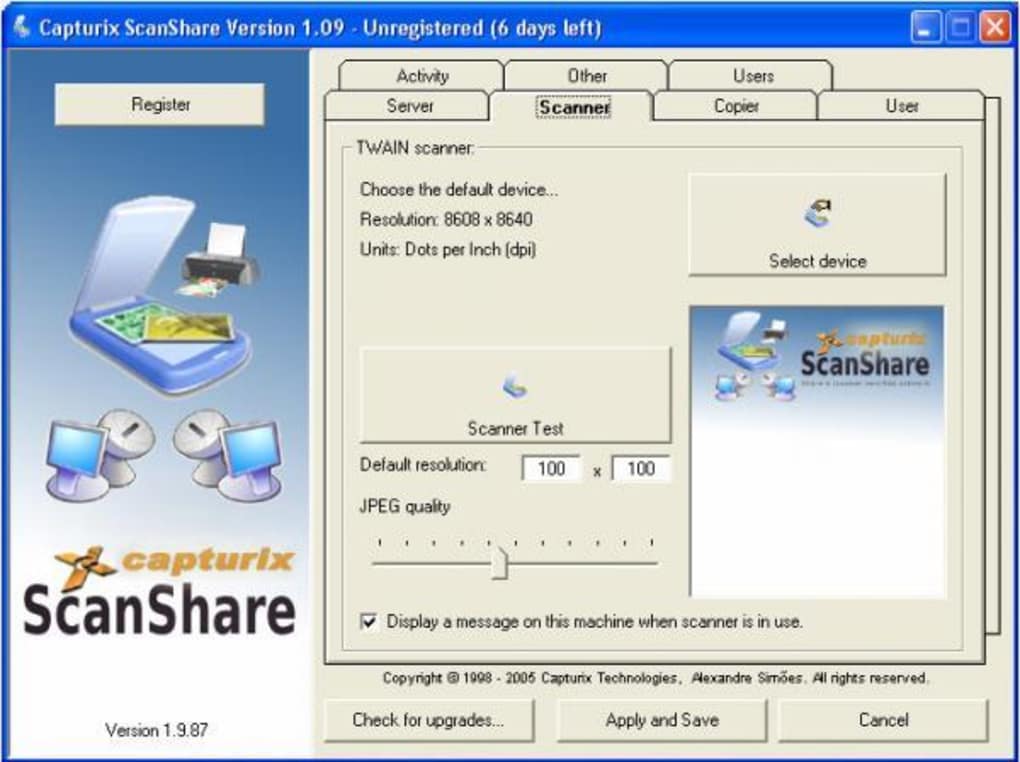
- Select your local scanner: The software scans the connected hardware and lists available devices. Choose the scanner you wish to share and confirm.
- Set network parameters: By default, ScanShare assigns an IP address based on the host’s subnet. If you need a static address, enter it manually in the “Advanced” tab.
- Enable security (optional): For environments where multiple users share the same network, enable password protection. Enter a strong password and distribute it only to authorized users.
- Access from client machines: On any other Windows PC in the same network, install the free client component (included in the download package). Open the client, enter the host’s IP address and password (if set), and the shared scanner appears as a local device.
The entire workflow—from download to first scan—usually takes under ten minutes. Because the application is built for legacy Windows versions, it does not rely on modern .NET frameworks, which eliminates compatibility headaches on older machines. However, note that newer Windows editions (Windows 10/11) are not officially supported, and attempting to run the program on those systems may require compatibility mode or a virtual machine running an older OS.
Supported operating systems: Windows 2000, Windows 98, Windows ME, and earlier Windows releases.
Pros & Cons
Pros
- Extremely small footprint—ideal for older PCs.
- Simple, wizard‑driven installation with minimal configuration.
- Works on legacy Windows versions that many modern tools abandon.
- No additional hardware required; turns an existing scanner into a network resource.
- Free trial with unlimited scanning during the evaluation period.
Cons
- Last official update was in 2008; may lack support for newer scanner drivers.
- Only compatible with Windows; no macOS, Linux, Android, or iOS client.
- Limited reporting and advanced management features compared to enterprise‑grade solutions.
- Security relies on simple password protection; no encryption for data in transit.
- Absence of automatic update mechanism; users must manually check for newer builds.
Frequently Asked Questions
Can Capturix ScanShare be used on Windows 10?
Officially no. The software was designed for Windows 2000 and earlier. While you can attempt to run it in Compatibility Mode, you may encounter driver conflicts or missing DLLs. For a reliable experience, use a supported legacy OS or a virtual machine.
Is there a limit to the number of client computers that can share the scanner?
The trial version imposes no hard limit on concurrent connections. However, performance depends on network bandwidth and the scanner’s own processing capability. In typical small‑office environments, up to ten simultaneous users work without noticeable slowdown.
Do I need administrative rights to install ScanShare?
Yes. Installing the service requires administrator privileges because it registers a network service and writes to the system registry. Once installed, regular users can operate the client without elevated rights.
How does the software handle driver compatibility with older scanners?
Capturix ScanShare uses the Windows TWAIN driver already installed for the scanner. As long as the host machine can communicate with the scanner using its native driver, ScanShare will forward the data to clients. No additional driver translation is performed.
Is there any cost after the trial period ends?
The trial version is free and does not automatically convert to a paid license. Capturix offers a commercial licence for organizations that need priority support and extended features, but continued use of the trial is permissible for non‑commercial, low‑volume scenarios.
Conclusion & Call to Action
Capturix ScanShare fills a niche that many modern networking tools overlook: reliable scanner sharing on legacy Windows platforms. Its tiny installation size, straightforward configuration wizard, and zero‑cost trial make it a compelling choice for small businesses, educational labs, or home users still operating on Windows 2000 or older. While the lack of recent updates and limited security features mean it isn’t suited for high‑risk environments, the core functionality remains solid for basic document digitisation across a local network.
If you need a quick, free solution to turn a single scanner into a shared office asset, give Capturix ScanShare a try. Free download is just a click away. Remember to back up your configuration after the trial, and consider a dedicated scanner server if your needs grow beyond the capabilities of this lightweight tool.
Ready to streamline your scanning workflow? Download Capturix ScanShare now and start sharing your scanner across multiple Windows devices in minutes.
Guides & Tutorials
How to install Capturix ScanShare
- Click the Download button above.
- Once redirected, accept the terms and click Install.
- Wait for the Capturix ScanShare download to finish on your device.
How to use Capturix ScanShare
This software is primarily used for its core features described above. Open the app after installation to explore its capabilities.
User Reviews
No reviews yet. Be the first to share your experience.
You may also like
more
Llama 2
Free-to-use large language model As the new addition to Meta’s arsenal of langua...

NotebookLM
Revolutionizing the note-taking and idea-generation process NotebookLM is an exp...

Github co pilot
AI-inspired software development and coding platform GitHub Copilot is a browser...

Google Gemma
Google’s lightweight AI models Introducing Google Gemma , a family of cutting-ed...

AI Image Enlarger
A free app for Windows, by ai-image-larger. AI Image Enlarger is a free software...

DALL E
AI-driven text-to-image transformation engine DALL·E is a free graphic and desig...